
This article walks you through getting your dropshipping products onto Google Shopping, from the Merchant Center setup that keeps your account out of suspension trouble to the campaign math that keeps your margins intact. You will see the five-step setup, the product data attributes Google actually cares about, the four dropshipping-specific problems that catch almost every new seller (supplier stock accuracy, long shipping times, thin margins, and store trust), and a sample starter budget you can plug your own numbers into. By the end you will know whether Shopping fits your product before you spend a dollar.
Logan Paul put it in a line I have my students write at the top of every campaign plan.
“If you really want something, you’ll find a way. If you don’t, you’ll find an excuse.” — Logan Paul
Google Shopping is a fundamentals game. Clean data and a trustworthy store beat clever tricks almost every time, and the sellers I have mentored into real Shopping revenue are the ones who committed to the boring work. Supplier feed accuracy. Honest shipping windows. Product pages that match the price in the ad. I have mentored more than 3,270 students across 17 years of ecommerce, and the ones who struggle on Shopping are almost always the ones who skipped a feed check because they wanted ads live yesterday. My Google Ads vs Facebook Ads comparison, my dropshipping SEO guide, and my traffic playbook all pair with the system below.
Why Google Shopping works differently from every other ad channel
On social platforms, you interrupt people. Someone is scrolling, sees your ad, and maybe stops. On Google Shopping, the shopper is already looking. They typed “waterproof dog bed large” and they are comparing photos, prices, and stores side by side.
That changes the game in three ways.
- You do not write the ad. Google builds each listing from your product data. Title, image, price, store name. Your feed is your ad.
- Intent is higher, volume is more limited. You only appear when someone searches for something close to what you sell.
- Price is front and center. Shoppers see your price next to your competitors’ before they click. If your price is not competitive, no amount of clever copy fixes that.
If you are deciding between channels, my Google Ads vs Facebook Ads breakdown and my Facebook vs TikTok ads comparison show where each one fits. Short version. Social is great for creating demand for something new. Shopping is great for catching demand that already exists.
The tradeoff is conversion rate. Shopping’s average cost per click sits around 0.66 dollars, with a conversion rate near 1.91 percent, lower than Search ads at roughly 4 percent, because people are still comparing options. Cheap clicks, pickier buyers. Keep those numbers in mind, because we will use them in the budget example later.
The search-first buyer journey that decides whether you win the click
Understanding how a Shopping buyer moves makes every setup decision easier.
- They search. Usually a product type plus a detail. Size, color, material, brand, or use.
- They scan. Thumbnails and prices do the first filtering. Your main image and title earn or lose the click in about 1 second.
- They compare. Shoppers open several listings. They check shipping cost, delivery time, reviews, and whether the store looks real.
- They decide. The store that feels safest and clearest usually wins. Not always the cheapest.
So you need to win three separate moments. The thumbnail, the title, and the product page. My product page optimization guide, my trust badges guide, and my store design guide each cover a slice of this journey.
How to get your products on Google Shopping in 5 setup steps
Step 1. Create and verify your Merchant Center account
Go to Google Merchant Center and sign in with a Google account you will keep long term, not a throwaway. Add your business name, country, and website URL. Then verify and claim your website so Google knows the store is yours.
Before you submit anything, make sure your site is ready. Google’s free listings requirements call for a site that meets its policies and product data that matches your live store. In practice, that means.
- A working checkout and visible prices in US dollars.
- A clear returns policy and shipping policy.
- Real contact details (email, and a physical or mailing address where applicable).
- The same business information on your site and in Merchant Center.
That last point matters more than people expect. Inconsistent business information is a red flag for Google’s automated systems, and a suspension review usually looks at your whole domain, not just one product. My returns address guide and my ecommerce fraud prevention guide cover the policy pages Google checks on your site.
Step 2. Prepare product images that meet the standard
Your image is the single biggest click driver. Use a clean, sharp photo of the actual product on a plain or neutral background, with no watermarks, promotional text, or logos stamped over it. Supplier photos are fine as a starting point, but remember that dozens of other stores may use the exact same image. If you can, add a lifestyle image or a re-shot version so you stand out in the grid. My Manus video ad guide and my successful store examples both show how winning stores produce their own imagery.
Check Merchant Center’s current image requirements before uploading, since size minimums are updated from time to time.
Step 3. Build your product data feed with the attributes Google needs
The feed is a structured file (or a sync from your store platform) that tells Google about each product. The core attributes are below.
| Attribute | What to put |
|---|---|
| ID | A unique, stable code per product. Never reuse or change it. |
| Title | Up to 150 characters. Lead with what the product is. |
| Description | Up to 5,000 characters. Plain, accurate detail. |
| Link | The exact product page URL. |
| Image link | Your main product image. |
| Price | In US dollars, matching the page. |
| Availability | In stock, out of stock, preorder, or backorder. |
Shipping costs need to be set in Merchant Center or in the feed for US sellers, and apparel and accessories need extra attributes. Gender, age group, color, and size. Branded products usually need a GTIN (UPC), MPN, and brand.
Your product pages should also carry the right structured data. Merchant listing markup focuses on offer details such as price, availability, shipping, and returns, and plain Product markup alone is not enough. My conversion tracking guide walks through installing both the schema and the conversion events together.
Step 4. Turn on free listings and link Google Ads
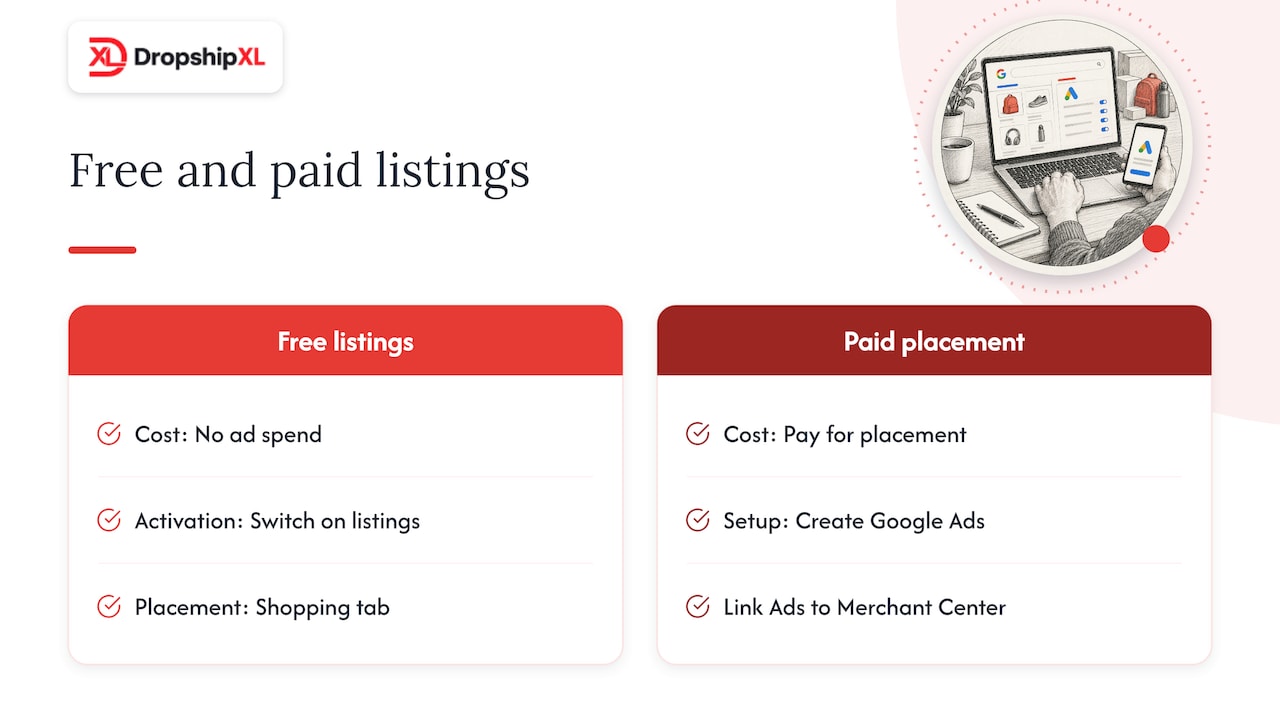
In Merchant Center, confirm that free listings are switched on. For most accounts this is enabled by default, but check it anyway. Once your products are approved, they can show in the Shopping tab without any ad spend.
Then, when you are ready to pay for placement, create a Google Ads account and link it to Merchant Center from the settings area. The same feed feeds both. Moving from free to paid is a separate business decision, and poor data quality hurts both channels. My dropshipping profit calculator guide and my ecommerce metrics guide cover the numbers you check before you turn ads on.
Step 5. Launch your first Shopping campaign the simple way
In Google Ads, create a new campaign with the sales goal, pick Shopping (or Performance Max), and select your Merchant Center feed. Start simple.
- Choose Standard Shopping if you want more control over which products get budget. Choose Performance Max if you want Google to spread spend across all surfaces.
- Set a daily budget you can afford to lose while you learn.
- Start with manual or target-ROAS-style bidding only after you have conversion data. Early on, keep it simple.
- Group products by category or margin so your best sellers do not compete with your weakest.
- Let it run for a full learning period before changing things. Constant tweaking resets the learning.
My Facebook ads guide, my launch checklist, and my batch task guide all cover the weekly rhythms that keep this learning phase on track.
Before and after on a product title that doubles the clicks
Titles are the cheapest thing you can improve. Supplier titles are usually written for a catalog, not for a shopper typing a search.
Before (supplier title).
Pet Bed Model PB-4420 Grey
After (shopper title).
Orthopedic Dog Bed, Large, Washable Cover, Memory Foam, Grey, 36 x 27 in
What changed.
- The product type comes first (“Orthopedic Dog Bed”), because that is what people search.
- Size, material, and color are included so the right shoppers self-select.
- The internal model number moved out of the title. It belongs in the MPN field.
- The new title is well under the 150-character limit, so nothing important is cut off.
Do not stuff in keywords that are not true of the product. Accurate and specific wins.
Mentor Tip. I have my students rewrite every supplier title in the voice of a shopper typing a search bar. If you would not type the words in your title into Google to find this product, those words do not belong in the title.
The 4 dropshipping problems that catch almost every Shopping seller
This is the part most guides skip. When you hold no inventory, four problems show up again and again. Here is each one with a realistic scenario and a fix.
Problem 1. Supplier inventory accuracy that kills your feed
Scenario. You list 200 products from a supplier. On Friday, 14 of them sell out at the warehouse. Your feed updates once a day, so for 20 hours Google still shows them as in stock. A shopper clicks, sees “out of stock” on your page, or worse, orders something you cannot ship.
Why it matters. Google crawls your landing pages and compares them to your feed. The availability in your product data and on your landing page must match, and the same crawl-and-compare check applies to price. Repeated mismatches can put your account at risk.
Fix.
- Choose suppliers that offer a product feed or API with stock and price data, not just a spreadsheet you update by hand.
- Sync your store with that feed as often as your platform allows, and schedule Merchant Center fetches shortly afterward.
- Add a stock buffer. Treat anything with fewer than 3 units at the supplier as out of stock.
- If a product keeps selling out, remove it from your campaigns instead of paying for clicks you cannot convert.
My supplier vetting checklist, my guide to finding suppliers that actually deliver, my supplier role breakdown, and my supply chains breakdown all cover sourcing from suppliers whose data you can trust. A supplier with accurate data is worth more than one with a slightly lower wholesale price.
Problem 2. Long shipping times that lose the comparison
Scenario. Your supplier ships from overseas, and orders take 12 to 20 days. Shoppers in the Shopping grid are comparing you to stores promising delivery in a few days. Your click-through is fine, your conversion rate is poor, and refund requests are high.
Fix.
- Source from US warehouses wherever possible, especially for your best sellers.
- Set accurate shipping speeds and costs in Merchant Center. Promising what you cannot deliver causes chargebacks and policy trouble.
- State delivery windows on the product page, in the cart, and in the confirmation email, so nobody is surprised.
- Send tracking as soon as it exists, and send a proactive update if something slips.
- If you cannot speed up delivery, compete on something else. A bundle, a better guarantee, or a niche product with fewer sellers.
My faster shipping guide, my USA dropshipping suppliers guide, and my chargebacks guide all cover the US-sourcing side. Sellers sourcing domestically can also get a strong backup shortlist from Watchman Advisors’ USA supplier directory.
Problem 3. Thin margins that lose money on average benchmarks
Scenario. You sell a 60-dollar item with a 45-dollar supplier cost. After payment fees, your real margin is about 12 to 13 dollars. At a 1.91 percent conversion rate, each sale takes roughly 52 clicks.
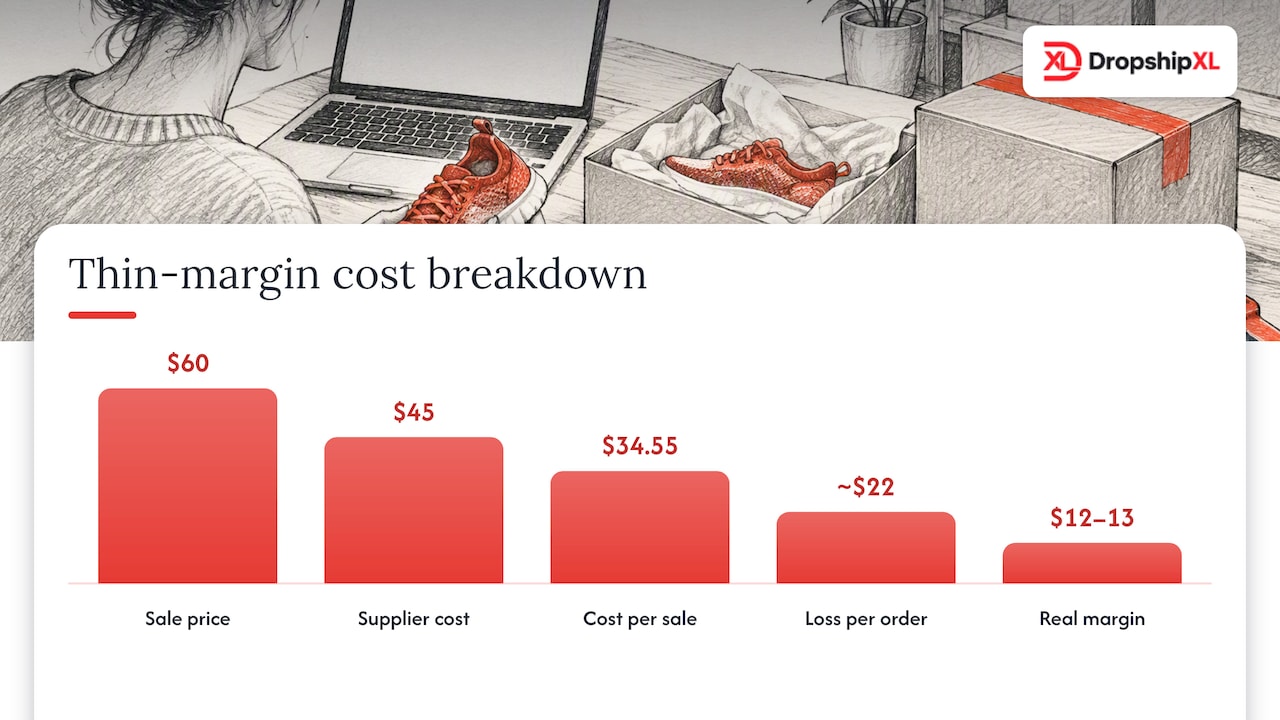
Run the math with the benchmarks above. At 0.66 dollars per click and 1.91 percent conversion, the average cost per sale is about 34.55 dollars (0.66 divided by 0.0191). Against a 12 to 13 dollar margin, you lose around 22 dollars on every order. These are averages, and your numbers will differ, but the arithmetic is a useful warning.
Fix.
- Find your break-even cost per acquisition before you spend. My Facebook ads guide walks through the math, and it applies to Shopping just as well.
- Favor products with a healthy gross margin and a higher order value, so each click can be paid for. My high-ticket dropshipping guide covers the economics that make the math easier.
- Use bundles and multipacks to lift average order value.
- Group products by margin in your campaign structure, and push budget toward the profitable groups.
- Drop products whose break-even numbers never work, however popular they look. My dropshipping saturation guide and my high-demand products breakdown both show how to pick products that fit.
Problem 4. Building trust for a store nobody knows yet
Scenario. A shopper likes your price and your thumbnail, clicks, then sees a generic template, no About page, a contact form but no email, and stock photos. They back out and buy from the next listing.
Fix.
- Add a real About page with a real name and story.
- Publish clear shipping, returns, and privacy policies and link them in the footer.
- Show a real email address and respond fast.
- Collect reviews from your first customers and display them on the product page.
- Use trust badges for secure payment, but only ones that are true.
- Make sure what you say on your site matches what is in Merchant Center. Consistency is part of trust with Google too.
My one-product store guide and my first-sale fast guide cover the trust elements that move an unknown store across the credibility line.
How to optimize your Shopping performance once you are live
The first 2 weeks are for data, not decisions. After that, work through this list on a regular rhythm.
- Search terms. Review what people actually searched. Add irrelevant terms as negatives (for example “free,” “used,” “DIY,” if they do not apply).
- Product-level results. Find products with lots of clicks and no sales, and pause them or fix the page. Find products with sales and low impressions, and give them more room.
- Titles and images. Test one change at a time on your top products.
- Price. Compare against what shows in the grid for your searches. A 4-dollar gap can decide the click.
- Feed health. Check Merchant Center diagnostics weekly for disapprovals and warnings.
Benchmarks give direction, not promises. My dropship automation guide covers how to turn these checks into a sustainable weekly habit without burning your evenings.
How to make your site actually convert Shopping traffic
Shopping clicks are not free sales. Your page has to finish the job.
- Match the promise. The price, image, and product shown in the listing must be exactly what the visitor lands on.
- Load fast on mobile. Most shoppers browse on their phones.
- Put the key facts above the fold. Price, delivery window, returns, and an add-to-cart button.
- Use real photos and honest descriptions. Answer the questions a buyer would ask in a store.
- Show reviews. Even a handful of real ones help.
- Keep checkout short. Offer guest checkout and familiar payment methods.
My store design conversion guide and my organic traffic guide go through each of these in detail.
Why I tell students to start free and earn the right to spend
After mentoring more than 3,270 students, I see the same pattern. People rush to run ads, then blame the platform when the numbers do not work. The platform is rarely the problem. The usual causes are a weak product, a weak supplier, or a store that does not earn trust.
My advice is to treat Shopping as a fundamentals game. Get your feed clean. Pick products where margin leaves room for advertising. Choose suppliers whose stock data you can rely on. Fix your store so a stranger would hand over a credit card. Then, and only then, start paying for clicks, with a budget small enough that a bad week teaches you something instead of ending your business.
This is the same seven-step process I used, and still use, to build and scale my own ecommerce brand, and it is the core of what I teach inside the program. Shopping is one tool in that process, not the whole thing. My niche validation steps and my scaling strategies guide both show how the fundamentals compound.
Mentor Tip. I have my students write out their break-even math on paper before they ever log into Google Ads. Price minus product cost minus fees minus refund allowance equals the maximum you can spend to get a sale. If that number is below the Shopping cost per sale for your category, change the product before you change the campaign.
Advanced tactics worth testing once the basics work
How to run remarketing without annoying people
Most visitors will not buy on the first visit. Remarketing shows ads to people who viewed products or added to cart. Keep the audience windows short at first (for example, 7 to 14 days), exclude people who already bought, and make the message about the exact product they viewed.
When to try Performance Max against standard Shopping
Performance Max runs your feed across Google’s surfaces using automated bidding. It is popular, but not automatically better. Industry data shows Performance Max accounted for a majority of Google Shopping ad spend in recent quarters, with a lower conversion rate and higher CPC than standard Shopping in several measurement windows. That does not mean avoid it. It means test it against a standard campaign with the same products and compare your own profit, not Google’s reported conversions.
A testing cycle that compounds learning instead of resetting it
Use a simple, repeatable loop.
- Pick one variable (title, main image, price, or product group).
- Change only that.
- Run for at least 2 weeks or until you have enough clicks to judge.
- Keep the winner, log the result, and move to the next test.
How to control spend before it controls you
Set rules before you launch, not while you are watching the numbers.
- A hard daily budget and a weekly stop-loss figure.
- A rule for pausing products. Once a product has spent 2 times its break-even cost per sale without an order, pause it.
- Scale winners by roughly 20 percent at a time, not doubling overnight.
My scaling walkthrough covers what to do once a product is clearly profitable.
A sample starter budget you can plug your own numbers into
This is an illustration to plan with, not a prediction. It uses the benchmark numbers above and a made-up product.
| Item | Example |
|---|---|
| Product price | $80 |
| Product cost, fees, and refunds | $52 |
| Margin per sale (break-even CPA) | $28 |
| Average CPC | $0.66 |
| Conversion rate | 1.91 percent |
| Estimated cost per sale | about $34.55 |
| Daily budget | $20 |
| Clicks per day at that budget | about 30 |
| Learning-phase budget (14 days) | $280 |
The estimated cost per sale (34.55 dollars) is higher than the 28 dollar margin, so this product loses money at average benchmarks. That is the point of running the numbers first. To make it work, you would raise the price, lift conversion with a stronger page, increase order value with bundles, or pick a product with a better margin. Treat the 280 dollars as tuition you can afford, and decide in advance what result earns more budget.
How DropshipXL helps you build a store ready for Shopping traffic
If you want a store that is ready for Shopping traffic from day one, my DFY Focus 1 and Mentoring package starts at 697 dollars with mentoring included. If you want the full seven-step framework and ongoing support, my DropshipXL Academy Membership is 997 dollars per year, and my MVP PRO Dropship Design Package is 2,897 dollars one-off for a done-for-you build. Not sure where to begin? Book a free 30-minute dropship mentoring call and I will walk you through where you are stuck.
FAQ
Is it really free to get my products on Google Shopping
Yes. In the US you can list products through free listings in Merchant Center with no daily budget. Paid Shopping ads are a separate option that charges per click.
How much do Google Shopping ads actually cost
There is no fixed price, since you pay per click and set your own budget. Industry benchmarks put the average Shopping CPC at around 0.66 dollars, but your cost depends on your category and competition.
Can I actually use Google Shopping if I dropship
Yes, as long as your store meets Google’s policies and your feed matches your live pages. The big risks for dropshippers are out-of-sync stock and prices, slow shipping, and weak store trust, all covered above.
Why was my Merchant Center account suspended
The most common cause is a mismatch between your feed and your landing page, especially price or availability. Business information that differs between your site and Merchant Center can also trigger suspensions. Fix the underlying data, then request a review.

Here are 4 other ways I can help you when you're ready: