
This article walks you through advertising on Pinterest for your dropshipping store, from the mindset shift that makes Pinterest ads work to a 10-step campaign setup you can run this week on a small budget. Pinterest is a planning and discovery platform, so ads that inspire or solve a problem beat ads that shout product features. You will see the ad types that convert best for beginners, the real cost math that keeps a thin-margin product from eating your test budget, the targeting split that keeps the algorithm from fighting itself, and the common mistakes that quietly drain small accounts.
Tom Brady said it the way a mentor would.
“You have to believe in your process. You have to believe in the things that you are doing to help the team win.” — Tom Brady
Pinterest rewards process more than instinct. The dropshippers who win on this platform are the ones who commit to a repeatable test cycle, change one variable at a time, and let data decide what to scale. I have mentored more than 3,270 students across 17 years of ecommerce, and almost every Pinterest failure I have seen comes from launching without tracking, picking a product with no margin room, or quitting after a single flat week. My Facebook vs TikTok ads breakdown, my Meta advertising guide for small businesses, and my traffic playbook all pair with the system below.
Why Pinterest is worth testing for a dropshipping store
Most beginners default to one platform and stay there. I understand the instinct. A single traffic source is a single point of failure, and Pinterest behaves differently from the feed-scrolling apps you already know.
People come to Pinterest to plan, not just to scroll
Pinterest is a discovery engine rather than a typical social network. People use it to plan future purchases, which means an ad that offers an idea or a solution often does better than one that only lists product features. For a dropshipper, that is a gift. Someone searching for “small apartment storage ideas” is already halfway to buying a shelf. My lifestyle brand examples and my successful store examples both show the inspiration-first angle in action.
Keyword targeting on Pinterest works like search
Pinterest lets you target broad, phrase, and exact match keywords, so you can reach people early in their shopping journey before they have picked a brand. If you have run Google campaigns, the logic will feel familiar. My Google Ads vs Facebook Ads comparison and my dropshipping SEO guide explain the intent-based thinking behind this kind of targeting.
The numbers are moving in dropshippers’ favor
A few data points worth knowing. Pinterest CPMs during the 2025 Cyber 5 window dropped around 26 percent year over year, while brand investment on the platform climbed roughly 61 percent in the same window as advertisers looked for lower-cost reach. Across the broader year, median Pinterest ad spend rose about 32 percent for advertisers active since Q1 2024, with CPMs up roughly 29 percent year over year. Costs swing month to month, and more advertisers are arriving every quarter. Pinterest is not a secret anymore, but it is still less crowded than the biggest paid social platforms.
Mentor Tip. I have my students resist the urge to move a whole budget to Pinterest because a report says CPMs are down. CPMs change by season and by month. Test with a small slice, then decide.
Which Pinterest ad types to use and when
Pinterest offers Standard Pins, Video Pins, Shopping Ads, Carousel Pins, and Idea Pins. You do not need all of them. Here is how I would sequence them for a beginner.
Shopping Ads for direct sales from your catalog
Shopping Ads pull from your product catalog and show price and product details. They often deliver the lowest cost per acquisition and the highest return on ad spend for direct sales, with conversion rates typically in the 2 to 3 percent range. They require a clean product feed, so budget time for that setup. My store design guide and my trust badges guide cover the page-side work that makes Shopping Ads convert.
Standard image Pins for your first product test
The simplest format. One vertical image, a title, a description, and a link. This is where I start students who do not have a catalog ready yet, because you can launch with one product and one image set.
Video Pins when your product deserves a demo
Short video shows the product in use. If you already produce short clips, the same shooting and hook habits translate. My Manus video ad guide and my TikTok marketing guide cover the production side, and the same clips reuse here.
Carousel Pins for products with variations
Carousels let you show several images or product angles in one ad. They work well when your product has variations, like colors or bundle options. My one-product store guide shows how to make a single hero product carry a carousel without feeling thin.
Idea Pins when you need awareness, not sales
Idea Pins suit awareness and engagement rather than sales. Their click-through rates are usually 0.2 to 0.4 percent. For a beginner testing a product on a tight budget, I would skip them at first.
| Ad type | Best for | Beginner priority |
|---|---|---|
| Shopping Ads | Direct sales from a catalog | High, once your feed is clean |
| Standard image Pin | Fast first test of one product | High |
| Video Pin | Showing the product in use | Medium |
| Carousel Pin | Variations and bundles | Medium |
| Idea Pin | Awareness and engagement | Low |
How to find your way around Pinterest Ads Manager
Pinterest Ads Manager can look busy the first time. Here is how I explain it to students. Menu names shift from time to time, so treat this as a map of ideas, not a button-by-button script.
The three levels every campaign uses
Every campaign has the same structure.
- Campaign. Where you choose the objective, such as conversions or catalog sales.
- Ad group. Where you set the budget, schedule, and targeting.
- Ad. The Pin people actually see, with its image, title, and destination link.
The big lesson is that targeting and budget live at the ad group level. If you want to compare two audiences, you need two ad groups, not two ads in one.
The reporting view that actually matters
The reporting area shows spend, impressions, clicks, CTR, CPC, and conversions. Add the columns you care about and ignore the rest. For a beginner, I pin these. Spend, link clicks, CPC, add to cart, checkout, and purchases. My ecommerce metrics guide covers the full numbers set for a dropship store.
Catalogs and conversions where the setup lives
The catalog area is where your product feed lives. The conversions area is where your Pinterest tag and events are checked. Both matter more than any button in the creative editor. My conversion tracking guide walks through the pixel setup end to end.
Mentor Tip. I have my students name campaigns and ad groups so they can read them in 6 months. Product, audience, date, like “LampA_Keyword_Oct26.” It sounds small. It saves hours later.
Creative specs that keep your Pinterest ads from looking cheap
Pinterest is a visual platform, and weak creative gets scrolled past. A few rules I give every student.
- Go vertical. Tall images, commonly 2:3, take up more of the screen than square ones. Check Pinterest’s current specs in its help center before you export.
- Use high-resolution images. Blurry supplier photos are the fastest way to look untrustworthy.
- Keep text readable on a phone. Short overlay lines, large type, high contrast.
- Show the product in a real setting. A lamp on a nightstand beats a lamp on white for inspiration-driven shoppers.
- Write titles and descriptions with keywords. Pinterest is search-driven, so use the words your buyer would type.
- Make the landing page match the Pin. If the Pin shows a blue ceramic planter, the click should land on that planter, not a general collection.
That last point is where many tests die. If your product page is slow, vague, or cluttered, the best Pin in the world will not save it. My product page optimization guide is the page I would read before you spend on traffic. For ideas on hooks and angles, my influencer marketing guide and my content marketing guide both show how to study what works in your niche without copying.
What Pinterest ads actually cost for a dropshipping store
Cost depends on your niche, season, targeting, and creative, so no one can promise you a number. What I can give you is a set of published benchmarks and a way to check them against your own margins.
| Metric | Benchmark | What it tells you |
|---|---|---|
| CTR | Above 0.5 percent is a healthy sign in most industries | Whether the hook and image are working |
| CPC | $0.50 to $1.00 is common in many industries | Whether the auction likes your ad |
| Shopping Ads conversion rate | Typically 2 to 3 percent | Whether the page and offer are closing the sale |
| Idea Pin CTR | 0.2 to 0.4 percent | Why Idea Pins underperform for direct sales |
These are third-party averages, not guarantees. Your store will not match them exactly.
Do the break-even math before you launch
Here is a worked example with made-up numbers to show the method. Say you sell a product for 40 dollars. Your supplier charges 18 dollars and shipping costs 5. That leaves 17 dollars before payment fees. Your break-even cost per acquisition is about 17 dollars.
Now apply the benchmarks. At a 0.75 dollar CPC and a 2 percent conversion rate, each purchase costs 0.75 divided by 0.02, or 37.50 dollars in ad spend. That loses money. Even at 0.50 CPC and 3 percent, you pay about 16.67, which is barely break even.
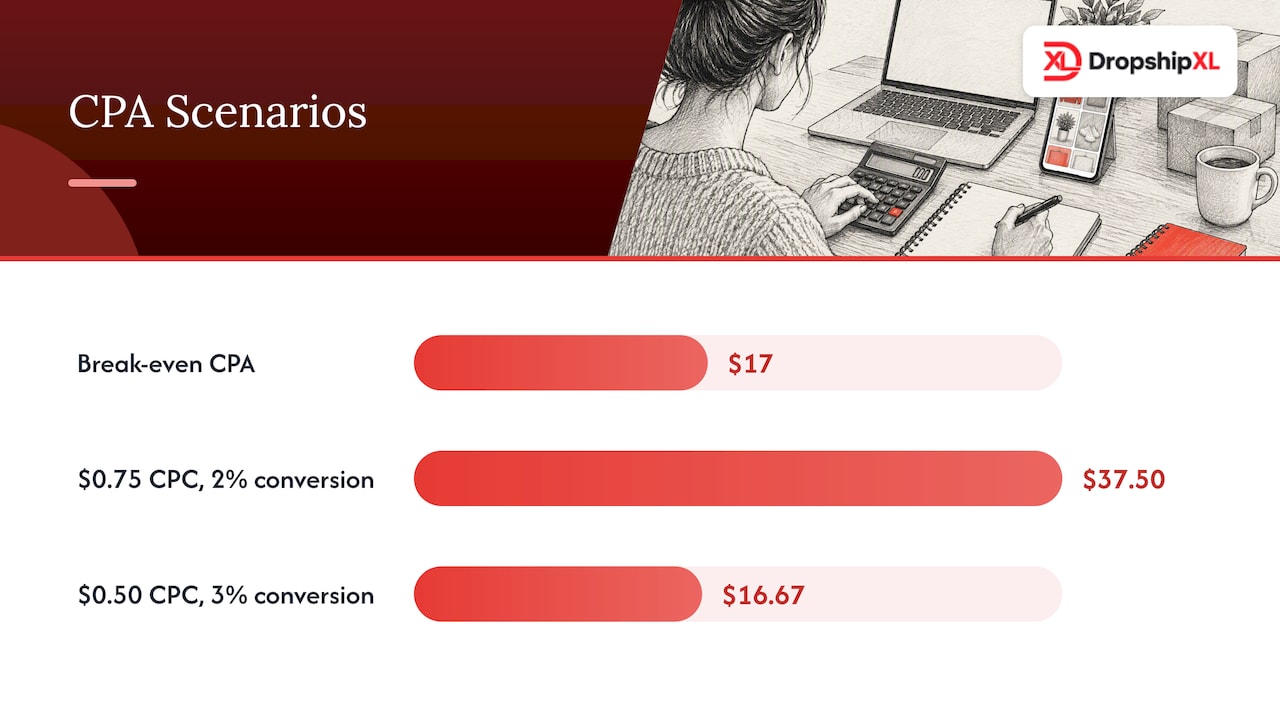
The takeaway is not that Pinterest does not work. It is that thin-margin products cannot absorb average ad costs. You need higher prices, bundles, or better margins. My dropshipping profit calculator guide and my Facebook ads guide both walk through break-even thinking that applies on any platform.
How much to spend on a first Pinterest test
A simple rule I teach. Set a test budget you can afford to lose completely, then split it across a few days and one or two products. For example, 20 dollars a day for 7 days is 140 dollars per test. That is an illustration, not a Pinterest requirement, so check the minimums Pinterest shows in your own account.
Paid traffic is also not your only route. If your budget is tight, pair ads with my organic traffic guide and my first-sale fast guide to stretch every dollar.
Mentor Tip. I have my students decide a stop-loss before they launch. Write down the spend at which you will pause a product if there are no add-to-carts. Emotion makes terrible budget decisions.
How to set up your first Pinterest campaign step by step
This is the order I follow with every new student. Do the early steps even if you are impatient. They make everything after them work.
- Create or convert to a Pinterest business account. It is free. Fill out the profile with your brand name, logo, and a short, keyword-aware description.
- Claim your website. This connects your store to your profile and gives you attribution on Pins that link to it.
- Install the Pinterest tag. Add it to your store so Pinterest can see page visits, add to carts, and purchases.
- Build your catalog. For Shopping Ads you need a hosted product feed that Pinterest can pull on a schedule. Front-load the category keyword in titles, then add color, material, size, or occasion.
- Choose your objective. For a store that wants sales, pick a conversion or catalog sales objective. Awareness objectives bring cheap impressions and little else.
- Set the budget and schedule. Use the daily budget you decided with your stop-loss. Run for at least several days before judging.
- Build your first ad group and targeting. Start with keywords. Use a small set of closely related terms in phrase and exact match, and add a few broad ones to explore. Keep Lookalikes out of this ad group.
- Upload or select your creative. Use vertical images or short video, a clear title with a keyword, and a link to the matching product page.
- Check your destination URL. Click it on your phone. Is the product visible without scrolling? Does checkout work?
- Publish, then leave it alone. Resist editing every few hours. Each major change can reset learning.
My dropshipping launch checklist and my dropshipping business plan guide both show how this campaign work fits inside the first 60 days of a new store.
How to split targeting across keywords, interests, and Lookalikes
Pinterest has thousands of interest categories that you can layer or exclude, and keyword targeting that mirrors search. The move is to separate Lookalike audiences from interest and keyword targeting so the algorithm can optimize for specific goals without conflicting signals. Practically, that means one ad group for keywords, one for interests, and one for Lookalikes once you have enough purchase data.
Mentor Tip. I have my students start with keywords that describe the problem or the idea, not only the product. “Cozy reading nook ideas” pulls in better buyers than the name of your product category.
How to track and measure Pinterest ad results
If you take one thing from this article, take this. Do not launch without tracking. I have reviewed many student accounts where the ads were fine and the tracking was broken, so the student quit a winner.
The Pinterest tag and the events it reports
The tag is a snippet on your site that reports actions to Pinterest. Set up page visit, add to cart, checkout, and purchase events. Then test each one yourself by walking through your store, and confirm it shows in Pinterest’s conversion tools.
Server-side tracking through the Conversions API
Browser tracking loses data to ad blockers and privacy settings. Server-side tracking through the Conversions API fills some of that gap. Pinterest recommends running browser and server tracking together. If you do, use a different Pinterest Tag ID for the server container than the one on the web side to avoid ingestion errors, and turn on event deduplication so purchases are not counted twice. This is an advanced step, so it can wait until you have a product that sells.
What to watch and when
- Day 1 to 2. Confirm events fire and the ad is approved and delivering.
- Day 3 to 5. Look at CTR and CPC. Weak CTR points at creative. Good CTR with no add-to-carts points at the page.
- Day 5 to 7. Judge add-to-cart and purchase cost against your break-even CPA.
A quick diagnosis chart I use in mentoring calls.
| What you see | Likely cause | First fix |
|---|---|---|
| Low CTR | Weak image or title | Test a new vertical image |
| Good CTR, no add-to-carts | Page mismatch or weak offer | Match the page to the Pin, improve price clarity |
| Add-to-carts, no purchases | Shipping cost, trust, or checkout friction | Review shipping, reviews, and checkout steps |
| Purchases above break-even CPA | Margin too thin or audience too broad | Raise price, bundle, narrow keywords |
Best practices for small-budget Pinterest testing
These are the habits that separate students who learn fast from those who just spend.
Change one variable at a time, every time
If you swap the image, the title, and the audience all at once, you will not know what moved the result. Change one thing. Wait. Compare.
Lead with inspiration, then show the product
Because people plan on Pinterest, ads that give an idea or solve a problem tend to outperform feature-led ads. Show the finished room, the packed lunch, the organized desk. Then show the product that makes it happen.
Plan around seasons the way Pinterest users do
Pinterest users look ahead. Holiday, back-to-school, and wedding content gets searched weeks before the event. Plan your activity across the whole year around holidays and seasonal trends, and start testing seasonal products early, not the week before. My high-demand products breakdown and my dropshipping saturation guide both show how to pick products with the right seasonal fit.
Build a simple tracking sheet you will actually use
Log every test. Product, audience, image, spend, clicks, add-to-carts, purchases, and your decision. Two months in, this sheet will be worth more than any course.
Mentor Tip. I have my students kill losers fast and feed winners slowly. When a test works, raise the budget in small steps rather than doubling overnight. My scaling strategies guide and my scaling walkthrough cover the next stage.
The common mistakes that drain small Pinterest accounts
I see the same mistakes again and again. Fix these and you are ahead of most beginners.
- Launching without tracking. You cannot optimize what you cannot measure.
- Picking a product with no margin room. Ads cannot fix a 6-dollar profit on a 25-dollar item.
- Mixing Lookalikes with keywords in one ad group. The signals conflict and the budget gets wasted.
- Using square, low-resolution supplier photos. They look like every other dropshipper.
- Judging after one day. Early numbers are noisy. Give tests a fair window.
- Editing constantly. Every edit costs you learning time.
- Sending traffic to the homepage. Send it to the exact product.
- Quitting after a single failed product. Testing is the job. One loser is data, not a verdict.
- Copying someone’s ad word for word. Use their angle as research, not as a template.
My niche validation steps, my guide to finding suppliers that actually deliver, and my supplier vetting checklist all cover the earlier work that prevents these mistakes from costing you a full test cycle.
How to treat Pinterest as a testing lab, not a lottery ticket
I teach beginners to treat paid traffic as a way to buy information, not to chase instant profit. Pinterest suits that approach because people arrive in a planning mindset, so a good idea-led Pin can show you quickly whether a product has real demand in its niche.
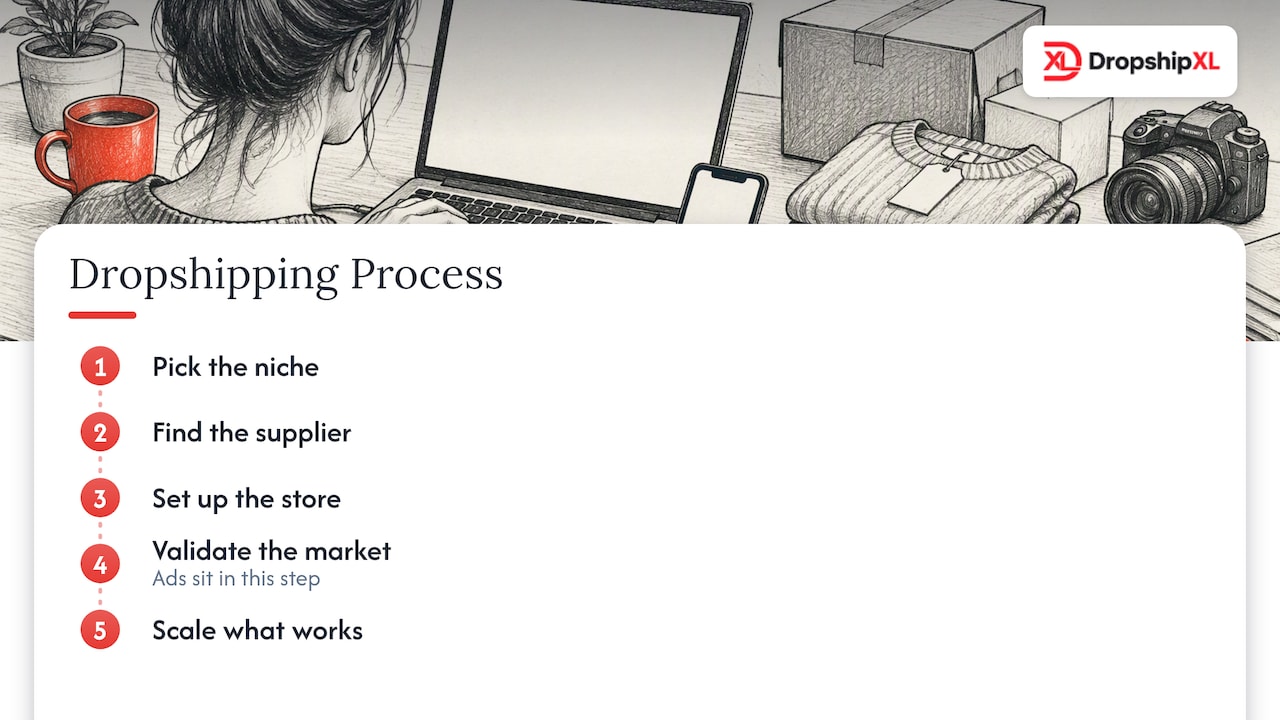
The students who do best follow my seven-step process. Pick the niche, find the supplier, set up the store, validate the market, then scale what works. Ads sit in the validation step. They do not replace the earlier ones. If you skip niche and supplier work and go straight to ads, you pay for the lesson twice. My beginner explainer on what dropshipping is and how it works is a good primer if any of those steps are new.
Do not hang everything on one channel either. Pinterest, Meta, Google, and organic traffic each answer a different question. Use them in turn, keep your numbers honest, and keep going. My Facebook vs TikTok ads breakdown and my affiliate marketing guide both cover how other channels fit alongside Pinterest.
Three example brands using the Pinterest testing method
These are illustrative examples I built to show the method. They are not real stores, and the numbers are invented to teach the thinking.
A home organization store that fixed its page
A new store sells drawer organizers. Instead of leading with the product, the owner makes vertical Pins of a tidy kitchen drawer with the line “Small kitchen, zero clutter.” Targeting is a keyword ad group around kitchen organization ideas. The first test shows a strong CTR but no purchases. The fix is on the page, where shipping costs appear too late. After the owner states shipping up front, the test is repeated. The lesson. A good ad can expose a weak page.
A pet accessories store that tested one variable at a time
A store sells no-pull dog harnesses. The owner tests two image styles with the same keywords. A studio shot and a person walking a dog in a park. The lifestyle image wins on CTR. The owner keeps the winner and tests a new title next, changing nothing else. The lesson. One variable at a time gives you answers.
A wedding favors store that planned for the season
A store sells personalized favors. The owner starts promotion months before peak wedding season because couples plan early. Keywords target phrases like “rustic wedding favor ideas.” Margins are healthy on bundles of 50, so the break-even CPA allows for ad costs well above the average. The lesson. Pick products whose margins and buying cycle fit the platform.
How DropshipXL helps you launch without the trial-and-error
If you would rather not learn all of this by trial and error, my DropshipXL Academy Membership walks you through the full seven-step process for 997 dollars per year. If you want a store built for you so you can focus on testing traffic, my MVP PRO Dropship Design Package is 2,897 dollars one-off, with lighter options available.
- MVP PRO Dropship Design Package. A done-for-you store built around a validated product your Pinterest ads can land traffic on.
- DFY Focus 1 and Mentoring package. A lighter 697-dollar starting point for a single high-converting page with direct guidance.
- Free 30-minute dropship mentoring call. Walk through your Pinterest plan, your break-even math, and your creative plan together before you spend a dollar.
- Ongoing 1-on-1 dropship mentoring. Personal guidance for sellers who want hands-on help.
FAQ
How much does it really cost to advertise on Pinterest
It depends on your niche, targeting, and season. Published benchmarks put CPCs between 0.50 and 1.00 dollar in many industries, but your own numbers will differ. Set a test budget you can afford to lose and check your break-even CPA before you scale.
Do I need a business account to actually run ads
Yes. You run ads from a Pinterest business account, which is free to set up. Claim your website and install the Pinterest tag early so your data starts building from day one.
Which Pinterest ad type should a beginner start with
Start with a standard image Pin for a fast first test, or Shopping Ads if your product feed is ready. Shopping Ads often show the lowest CPA and highest ROAS for direct sales. Save Idea Pins for later, since they are mostly for awareness.
How long should I run a Pinterest test before deciding
Give it several days at minimum, and judge on add-to-carts and purchases rather than clicks alone. Early numbers swing a lot. Decide your stop-loss in advance so you are not deciding while emotional.
Can I advertise on Pinterest for free
You can post organic Pins at no cost, and they can bring traffic over time. Paid ads speed up testing. Many students combine both, and my organic traffic guide shows how to get started.

Here are 4 other ways I can help you when you're ready: