
What if the two hours between dinner and bed were the only two hours your business ever needed? Yes, evening-only hours are enough to run a profitable dropshipping store if you build around automation, a strict nightly checklist, and clear escalation rules. A done-for-you setup like my MVP PRO Dropship Design Package can help wire in automation and SOPs to streamline your evening workflow.
- The Nightly Checklist That Actually Works
- Three Schedules, Pick One by Time
- What to Automate First
- Build Hybrid Support, Not On-Call
- Batch the Weekend, Keep Evenings Light
- The Numbers That Prove It’s Working
- Why My Process Builds This In From Day One
- Guard Your Evenings on Purpose
- Build the Store Before You Need It
- Frequently Asked Questions
The Nightly Checklist That Actually Works
A dropshipping evening hours workflow works when it follows the same order every night. Randomly checking email, then Slack, then your ad account wastes minutes you don’t have. Structure removes the decision fatigue that eats into a short session.
Before you touch anything else, glance at three numbers: how many orders came in since your last check, how many are flagged as exceptions (stuck tracking, payment holds, address issues), and whether your supplier has an overnight order cutoff you’re about to miss. That thirty-second scan tells you whether tonight is a fifteen-minute night or a full-session night.
Step 1: Order intake and exception scan. Open your order dashboard first, not your inbox. Tag anything with a failed charge, a duplicate order, or a shipping address that looks incomplete, the same patterns I walk through in my fraud prevention guide for ecommerce. These are the orders that turn into refund disputes if they sit untouched for 48 hours.
Step 2: Tracking and shipment confirmations. Most tracking updates should already be syncing automatically between your supplier and your store. Your job at night is to review the exceptions the system couldn’t resolve on its own, not to manually refresh forty tracking numbers. If a shipment has gone stale (no scan movement in 3 to 5 days), that’s the one worth your attention.
Step 3: Support triage. Pull up your support queue and sort by urgency, not by arrival time. A “where is my order” message from someone who ordered two days ago can wait for a templated reply. A message threatening a chargeback needs a human response tonight.
Step 4: Optional growth tasks. Only after the first three steps are clear should you touch anything that isn’t operational. That means checking how a product post performed, glancing at ad spend versus conversions, or scheduling tomorrow’s content.
Here’s what that looks like as a repeatable sequence.
- Scan new orders for payment or address flags (2 to 5 minutes)
- Review stale tracking exceptions flagged by automation (5 to 10 minutes)
- Send templated replies to routine support tickets (10 to 15 minutes)
- Escalate anything involving refunds, chargebacks, or angry customers (variable)
- If time remains, check one marketing metric and one supplier update (10 to 15 minutes)
Mentor Tip: Keep a running “escalation tag” in your help desk labeled URGENT_TONIGHT. Anything that gets that tag is the only thing allowed to break your checklist order. Everything else waits until tomorrow’s session, even if it feels pressing at 9 p.m.
The point of this sequence isn’t to do everything every night. It’s to guarantee that the things capable of losing you money or a customer relationship get seen first, even when you only have twenty free minutes before your kids need help with homework.
Three Schedules, Pick One by Time
Part-time builders typically need 1 to 3 hours a day during launch, dropping to 30 to 90 minutes nightly once automation and SOPs are in place. If you’re not past launch yet, my 7-step guide to starting a dropshipping business covers what that launch phase actually involves before you’re ready to shrink down to an evening-only routine. Which schedule fits you depends on order volume and how much of your workflow you’ve already automated.
The 30-minute plan (critical checks only):
- Minutes 0 to 5: Scan for order exceptions and payment flags.
- Minutes 5 to 15: Check WISMO (where-is-my-order) flags raised by automation, respond to anything stale beyond 5 days.
- Minutes 15 to 25: Send templated replies to the two or three most urgent support tickets.
- Minutes 25 to 30: Log anything unresolved into tomorrow’s queue so it doesn’t get lost.
The 60-minute plan (checks plus one growth task):
- Minutes 0 to 20: Run the full 30-minute critical check sequence above.
- Minutes 20 to 35: Review supplier notes. Confirm no stockouts or price changes on your top 5 SKUs.
- Minutes 35 to 50: Handle one marketing activity: reply to comments, check a single ad’s performance, or schedule a post.
- Minutes 50 to 60: Update your simple dashboard (covered later) with tonight’s numbers.
The 120-minute plan (extended checks plus batch prep):
- Minutes 0 to 30: Full critical check sequence, unhurried.
- Minutes 30 to 60: Supplier follow-ups on anything pending more than 48 hours, plus a quick audit of new product listings for accuracy.
- Minutes 60 to 90: Batch content or ad creative prep for the coming weekend.
- Minutes 90 to 120: Review last week’s numbers against this week’s, and adjust one thing (a reply template, an automation rule, a supplier choice) based on what you see.
As order volume grows, the 30-minute plan stops being optional. It becomes the mandatory floor even on your busiest nights, with the 60- and 120-minute versions reserved for whichever evenings you actually have the bandwidth. The mistake most part-time dropshippers make is trying to run the 120-minute plan every night out of guilt. That’s the fastest route to quitting within a month. Pick the plan that matches tonight’s actual free time, not the plan that matches your ambition. I cover this same time-budgeting question in more depth in my dropshipping career path guide, since how many hours you actually have shapes which track makes sense for you.
What to Automate First
Order routing, label buying, and tracking sync deliver the largest evening time savings of any automation you’ll set up, because they touch every single order rather than a subset of edge cases. Core dropshipping automation covers inventory syncing, product data uploads, order routing, and shipment tracking, and the ones worth building first are the ones that fire on 100% of your volume.
That prioritization matters more than most new dropshippers realize. It’s tempting to automate the interesting stuff (dynamic pricing, personalized email flows, the kind of post-purchase sequences I cover in my guide to building a full-time dropshipping income) before the boring stuff (routing an order to the right supplier without you clicking a button). I tell every student to start with tasks that touch every order and delay automation of low-volume edge cases until the core is solid.
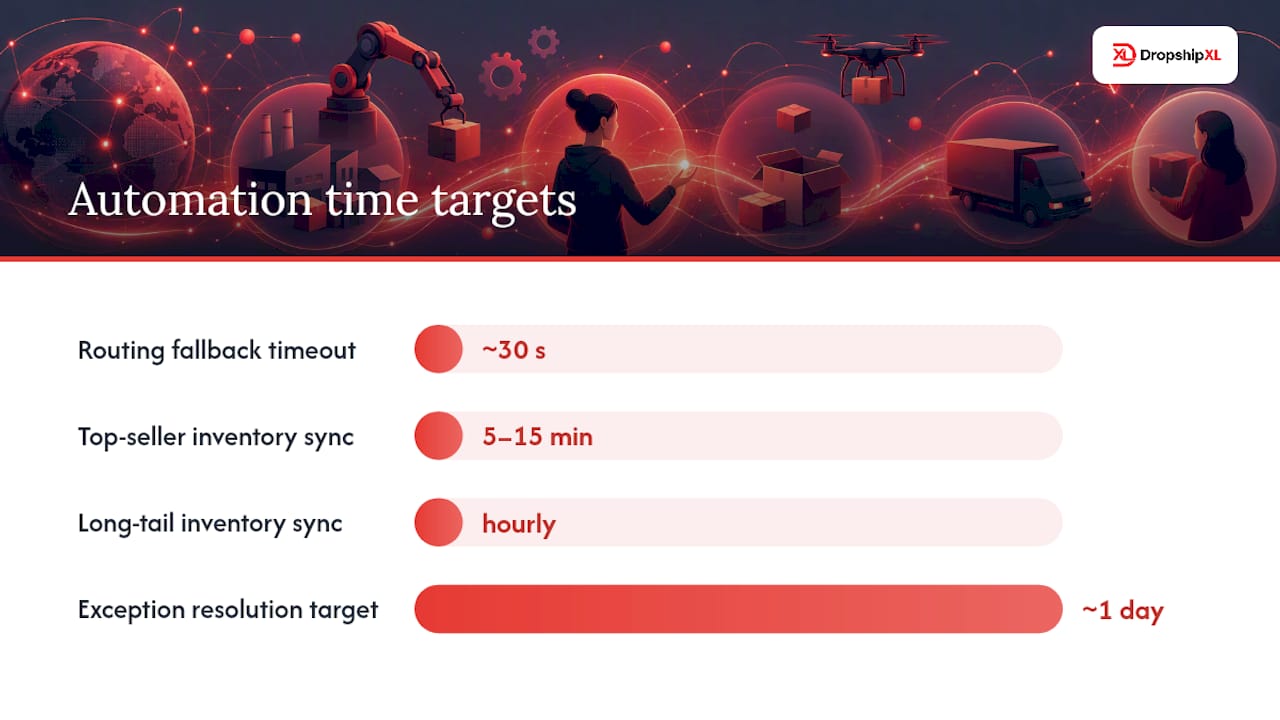
Inventory sync cadence should scale with how fast a SKU sells. Top sellers need refreshing every 5 to 15 minutes; long-tail products can sync hourly without much risk. Add a safety stock buffer of 1 to 3 units, or 5 to 10% of on-hand inventory for volatile SKUs, so a sync delay never sells something that just went out of stock. My inventory management tools guide covers which platforms handle this syncing reliably versus which ones you’ll end up babysitting.
Order routing should include a fallback plan, not just a single supplier connection. A well-built router checks a primary supplier first, falls back to a secondary if that supplier’s API doesn’t respond within roughly 30 seconds, and uses geography as a tiebreaker when two suppliers can fulfill the same order. Every routing decision should write itself back onto the order record so your support team (even if that’s just you) can see exactly why an order went where it went.
Automated exception workflows should flag anomalies like stale tracking and proactively notify the customer, with a target resolution window of about one day for anything the system can’t resolve on its own.
That one-day target is the number to build your evening checklist around. If an exception sits flagged for longer than a day without a human looking at it, your automation isn’t doing its job, or you’re not checking in often enough.
Here’s what belongs on your automate-first list, roughly in build order.
- Order routing with primary/secondary supplier logic and a timeout fallback
- Shipment tracking sync with automatic customer notification
- Inventory sync tied to SKU velocity
- Automated flagging of stale tracking or failed delivery attempts
- Templated auto-replies for the most common support questions (order status, shipping time, return policy)
None of these automations should be allowed to issue a refund above your policy cap, cancel an order without a paper trail, or respond to a customer threatening a chargeback. Those decisions stay with a human, every time, no exceptions. Governance isn’t about distrust of the software. It’s about making sure the two or three decisions that can actually hurt your business never happen on autopilot.
In my experience, you want these systems live before your daily order volume passes roughly 50, because that’s the point where manual handling starts creating the exact backlog your evening hours can’t absorb.
Build Hybrid Support, Not On-Call
A hybrid model, meaning automation for routine WISMO questions and human review for policy exceptions, is the right default for almost every part-time dropshipper. A fully automated model risks giving a wrong answer to a customer with a genuinely unusual problem. A manual on-call model, where you personally answer every message as it comes in, creates an unofficial night shift that leads straight to burnout.
Hybrid works because it splits labor along the line that actually matters: repetitive versus judgment-based. Order status, shipping estimates, and return policy questions get automated replies. Anything involving money above a set threshold, a shipping failure past a certain number of days, or an emotional customer gets routed to a human queue you check during your evening session.
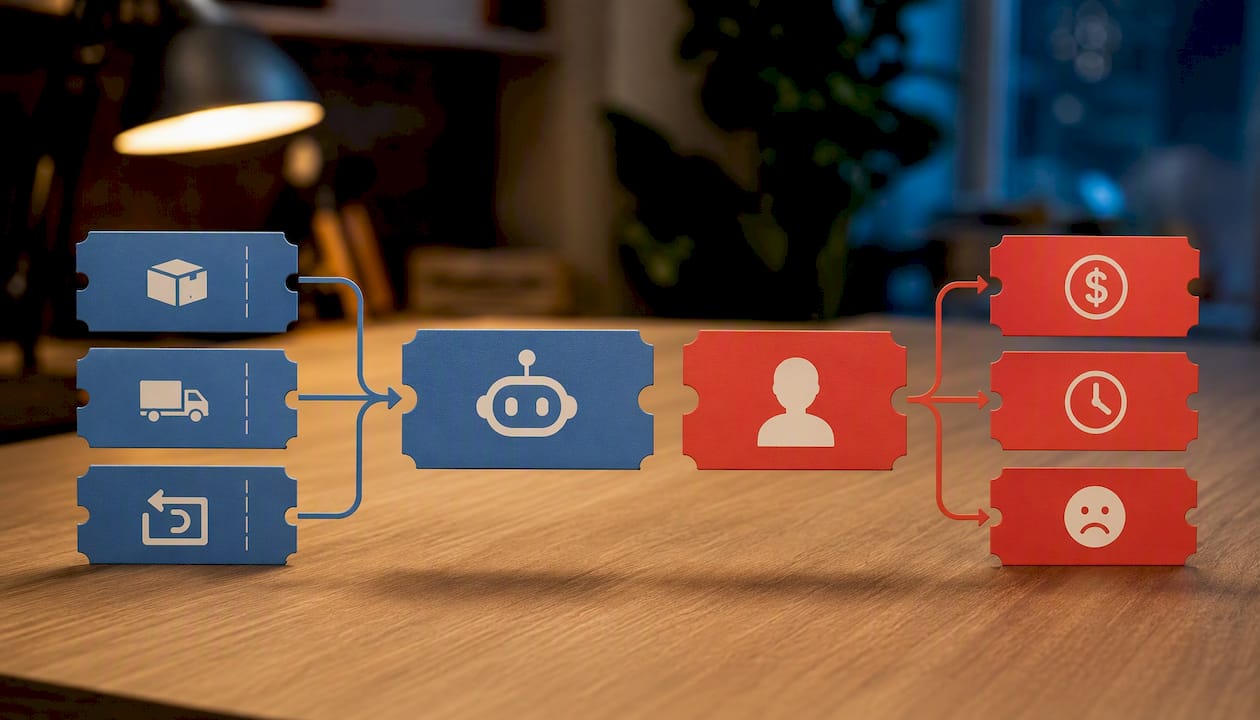
Fully automated support can handle a narrow slice of questions well but tends to frustrate customers with anything slightly outside the script. It’s a reasonable stopgap in your first weeks, not a permanent solution.
Manual on-call feels responsive but doesn’t scale, and it trains customers to expect instant replies at 11 p.m., which then trains you to keep checking your phone all night.
Governance for a hybrid model needs explicit rules written down, not just assumed. That means a refund cap your automation can approve without you (say, under $20), a hard rule that any payment dispute or chargeback threat gets flagged for immediate human review, since your payment processor choice affects how much of that dispute process you can automate in the first place, and a cancellation window (often 24 hours) beyond which cancellations require manual approval. My refund policy guide for dropshipping covers exactly how to set that cap and word the policy so it holds up when a customer pushes back on it.
A simple escalation checklist for evening review looks like this.
- Refund requests above your policy cap get flagged, not auto-approved
- Any order with a payment hold or fraud flag waits for a human
- Shipping delays beyond your supplier’s stated window get a personal reply, not a template
- Angry or threatening messages always get escalated, regardless of dollar amount
Mentor Tip: If you’re ready to delegate, write a one-page virtual assistant brief that defines exactly which ticket types they can close on their own and which ones must wait for you. Vague instructions like “handle customer service” lead to a VA either escalating everything (defeating the purpose) or approving refunds they shouldn’t (costing you money).
Hiring a VA for two or three evening hours a week often costs less than the revenue you’d lose from a slow response rate, but only once your ticket volume is consistent enough to justify a fixed cost. Below a certain volume, the hybrid model alone is usually enough.
Batch the Weekend, Keep Evenings Light
Batching means doing a week’s worth of a single task type in one sitting, usually on a weekend, so weeknight sessions can stay focused purely on exceptions and quick wins. This is the difference between a workflow that feels sustainable after three months and one that quietly falls apart.
- Batch content creation. Set aside 60 to 90 minutes on a Saturday or Sunday to write and schedule a full week of social posts or product highlights. This removes “what do I post tonight” from every evening session.
- Batch supplier audits. Once a week, review pricing, stock levels, and shipping times across your top suppliers in one sitting instead of checking piecemeal every night. My guide on the role suppliers play in your store’s success covers exactly what to check during this weekly audit, and working with vetted USA dropshipping suppliers from the start tends to cut this audit time down considerably, since tracking sync and cutoff times are far more predictable.
- Batch product imports. New product research and listing work belongs in a weekend block, not squeezed between support tickets on a Tuesday night. My product research tools guide covers which tools make that weekend block fast instead of a rabbit hole.
- Write SOPs as you go. Every time you solve a new problem (a weird tracking issue, an unusual refund request), write down exactly what you did in a shared document. That document becomes your evening brief for a future VA, and it becomes the reference that keeps you from relearning the same lesson twice.
The hire-versus-DIY decision usually comes down to a simple trade: if your evening sessions are consistently running over 90 minutes because of support volume, the cost of a part-time VA (often just a few hours a week) tends to pay for itself in time you get back. If your sessions are still under 30 minutes most nights, keep doing it yourself and invest the money into automation instead.
Templates cut evening review time more than almost any other single change. A library of five to seven pre-written responses covering your most common ticket types (shipping delay, wrong item, return request, order cancellation, tracking not updating) turns a five-minute reply into a fifteen-second one.
The Numbers That Prove It’s Working
First response time, or FRT, and your on-time ship rate are the two numbers that tell you whether your evening workflow is holding up under real order volume. If either one is drifting the wrong direction, something in your nightly checklist isn’t keeping pace.
A reasonable FRT target for a part-time store is same-day for anything flagged urgent, and within 24 hours for routine tickets. Resolution for automated exceptions should land around one business day. On-time ship rate should stay above 90 to 95%, depending on your suppliers’ stated windows, which is exactly why supplier reliability shows up in your KPIs whether you’re tracking it directly or not.
Track manual touches per order as a leading indicator. Before automation, most stores need 6 to 10 manual touches per order; a well-automated evening workflow should bring that down to two or fewer. Set checkpoints every 4 to 8 weeks to measure whether your automation rollout is actually moving that number.
A simple nightly dashboard doesn’t need software beyond a spreadsheet or your platform’s built-in reporting.
- Orders received since last check, and how many are flagged
- Open support tickets, sorted by urgency
- On-time ship rate for the past 7 days
- Manual touches per order, tracked weekly
When FRT starts creeping past 24 hours or your on-time ship rate dips below 90%, that’s your signal to either add automation coverage or bring in help. Waiting until customers start complaining publicly means you’ve already waited too long. My dropshipping business plan guide covers how to build this same weekly-review habit into your broader business planning, not just your evening checklist.
Why My Process Builds This In From Day One
The gap between a dropshipping store that eats your evenings and one that respects them almost always traces back to how the store was set up in the first place. I built my 7-step dropshipping process to close that gap from day one, not patch it later.
Niche selection done right (step one) avoids products with high return rates or confusing sizing, which are the exact categories that generate the most late-night support tickets. Supplier vetting (steps two and three) means you’re working with partners who already have reliable tracking sync and clear cutoff times, instead of discovering those gaps three months in through a flood of WISMO complaints. My dropshipping business launch checklist sequences this exact vetting work so you catch these gaps before launch instead of after.
Automation and platform setup (the middle steps) wire in the order routing, inventory sync, and tracking automation covered earlier, before you ever process your first real order. That sequencing matters. Retrofitting automation onto a messy store takes far longer than building it in from the start.
The later steps, covering marketing validation and scaling, are where the SOPs and evening brief templates get formalized, so the workflow that worked for you at ten orders a day still works at fifty, the same territory I cover in my guide to scaling a dropshipping business like a pro. This 7-step process is designed to build a low-maintenance evening routine that holds up across stores at different scales.
Guard Your Evenings on Purpose
What would happen to your business if you simply stopped checking it after 9 p.m. for one week? Most part-time dropshippers never test that question because they’re afraid of the answer. Early on, it’s easy to confuse being available with being effective. Answering every message the moment it arrives feels responsible. It’s actually the thing most likely to burn you out by month three.
The lesson that took me the longest to learn is that a store built on rules survives your absence better than a store built on your attention. If your automation and escalation tags are doing their job, stepping away for a night shouldn’t create chaos. If it does, that’s not a scheduling problem. It’s a signal that something upstream needs fixing, whether that’s your business plan or the structure underneath it, and I walk through exactly how to diagnose that in my guide on how dropshipping risk actually works for new sellers.
Tonight’s experiment: pick one recurring ticket type you keep answering manually, write a template for it, and let it run untouched for a week. Watch what actually breaks, if anything.
Build the Store Before You Need It
The fastest way to a genuinely low-maintenance evening routine isn’t willpower. It’s a store built correctly the first time, with automation and SOPs wired in before your first order ever ships. A done-for-you store setup can include supplier approval guidance and automation wiring to help you avoid learning routing logic and tracking sync late at night.

My MVP PRO Dropship Design Package is designed for part-time founders who want a store that runs on checklist and escalation rules from the start, helping you avoid the need to reverse-engineer workflows after trial and error. Visit the done-for-you design package page and request a consult to explore tailored build options, or if you’d rather talk it through first, a Free 30-minute dropship mentoring call is a good place to start. If you already know you’re ready, you can go ahead and join the DropshipXL Academy.
Frequently Asked Questions
Is Dropshipping Dead in 2026?
No. Dropshipping remains active and profitable when run with realistic automation and clear operational rules; what’s dead is the assumption that it can run itself with zero oversight or a manual, all-hours support style.
Can I Make $10,000 a Month Dropshipping Part-Time?
It’s possible but not guaranteed, and it depends heavily on niche, ad spend, and how quickly you move past manual order handling into an automated, checklist-driven workflow like the one outlined above.
How Many Hours a Week Do You Need for Dropshipping?
Launch phases typically need 1 to 3 hours daily, while a mature store with automation and SOPs in place can run on 30 to 90 minutes a night.
Are Dropshippers Millionaires?
Some are, but most part-time dropshippers aim for meaningful supplemental or full replacement income rather than millionaire status; consistent, disciplined evening operations tend to matter more than any single viral product.
What’s the Fastest Way to Set Up a Low-Maintenance Store?
Working through a structured process, like the 7-step dropshipping method I’ve used with thousands of students, or opting for a done-for-you build through my MVP PRO Dropship Design Package, shortens the path considerably compared to building automation and SOPs from scratch.

Here are 4 other ways I can help you when you're ready: